The <table> tag |
|
| The <table> command starts a table, and the </table>. However, that alone will not allow you powers to flow freely through the ways of the table. | |
| The <tr> and <td> tags must be used inside of the table. | |
| It's really difficult for me to explain how a table works so I'm going to give you examples with detailed descriptions. |
Examples | |
| Study the picture below for a while. | |
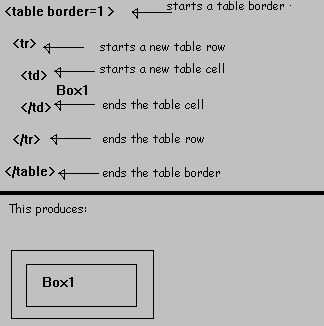 | |
| This is the simplest table you can make; it has only one cell and one row. | |
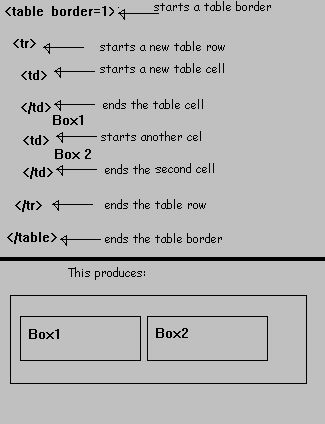
| If you wanted two cells and one row you would do this: | |
|
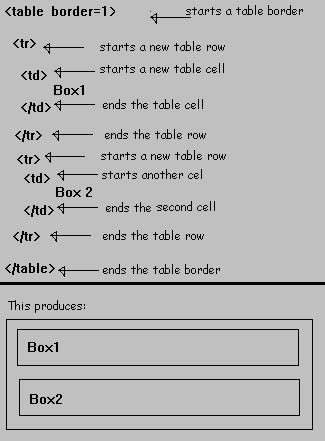
If you wanted two cells and two rows you would do this: |
|
| The <table> tag has a lot of different attributes. The majority of them are listed below: |
| bgcolor | Changes the background color of the table. | ||
| background | Changes the background textur of the table. | ||
| bordercolor | Changes the base color for the table. | ||
| border | changes the thickness of the table border. | ||
| bordercolorlight | Changes the color of the upper left hand corner of the table(doesn't work with most Netscape versions). | ||
| bordercolordark | Changes the color of the lower right hand corner of the table(also is mostly incompatable with Netscape). | ||
| cellpadding | This is the distance inbetween the inner cell border, and the outer table border. |
| In the next, and final chapter of the HTML Dojo we go over forms so that you can use them in the JavaScript Tutorial that I made. | |


|
|